Microsoft Office 2007
Microsoft Office 2007 is a productivity app including Word, Excel, PowerPoint

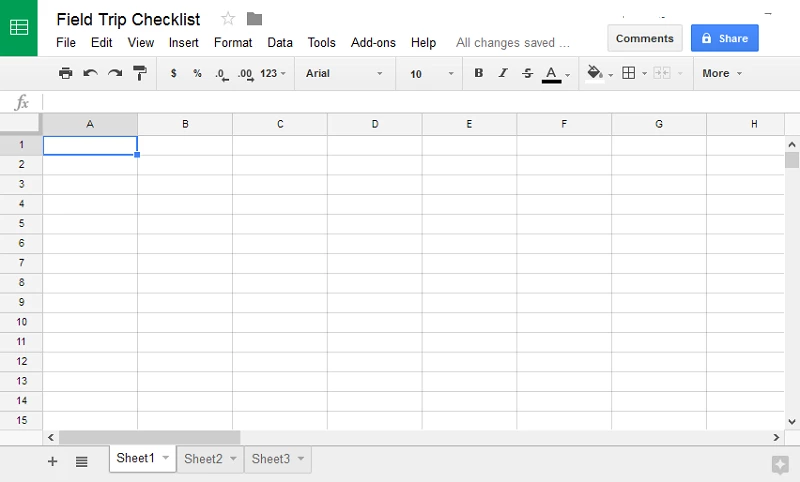


Google Sheets gives you direct access to your spreadsheet projects without logging into your email account or the relevant cloud storage. It is developed by Google as part of Google Drive, basically designed as a web-based app that can be run from any type of operating system. It offers compatibility with the Microsoft Excel file format, with the fastest functions like creating, viewing, editing, reviewing, and finalizing spreadsheets.
The tool offers some other productivity apps such;
The streamlined, as well as the familiar interface, offers a general layout with all basic functionalities. A drop-down menu displays all features and icons that can be sorted by the style of their use: formatting, cell design and layout, formulas, and so on. The formula commands are arranged in different categories. You will see all the function keys easily on the UI.
A spreadsheet offers all basic functionalities such as adding rows, columns, and cells. You can hide, remove, or move the rows and columns, and freeze them in the same place for use later. Automate repetitive tasks while creating macros and using keyboard shortcuts.
Multiple types of charts, like line and combo charts, area charts, column charts, bar, pie, scatter, and geo charts, for you to use and display your data perfectly. The customization feature enables you to change the look of the chart while changing axes, series, and adding labels.
Analyze the data shown on the charts by clicking the ‘Explore’ button in the bottom-right corner of the app. Here you can ask questions about exploring the data.
A plethora of templates for spreadsheets is available to get a unique running start for document creation. These templates are including with to-do lists, budgets, calendars, schedules, traveling, wedding plans, team rosters, invoices, timesheets, purchasing invoices, and expenditure details. Download templates from any 3rd-party can also be possible to get reports of traffic websites, Gantt charts, project tracking, and so on.
Enhance the functionality of the app using 3rd-party add-ons. You can use add-ons for different purposes, such as mail merging and statistics, to cell and format management. Use the Google Apps Script for creating custom items like menus, dialogs, and sidebars.
G Suite is the business version of Google Docs editors. It has Gmail, Docs editors, Drive, and Calendar for managing business issues. It is the best option for an organization of 25 people while offering business-level security, business administration tools, and the Hangouts Meet app for making calls.
It is fully compatible with Excel files as it can edit Excel files, convert them into Google Sheets, and use features like comments, action items, and Smart Fill. You can work in the native format with the help of OCM (Compatibility Mode) and save as well as export files in Excel formats.
The connection with other Google apps makes Sheets a lot more reliable. You can save your Google Sheets in Google Drive. All of your changes in Sheets will be saved automatically to the cloud storage. You will find 15GB of free cloud storage for your device. In case of extra need for cloud storage, you have purchased the subscription plan: 100GB for $19.99 per year and 1TB for $99.99 per year.
Analyze your content using comments and assign action items that make sharing and real-time editing quite easy. Add the name and email address of collaborators, click on the ‘Share’ option in the top-right corner of the screen, and share it with others. It enables you to create a shareable link also. You can check the names of collaborators who have edited, commented, viewed, printed, copied, or shared your Sheet. Open the ‘message window’ and talk to others about any file. Tap to File>Version history to watch the changes or edits made by your collaborators.
Google Sheets is one of the most powerful apps designed by Google. It enables you to create, edit, and manage all tasks related to spreadsheets. It offers compatibility with Microsoft Excel and provides complete collaboration between you and your co-workers.
Pros
Cons

Microsoft Office 2007 is a productivity app including Word, Excel, PowerPoint

Adobe Reader offers quick functionality for viewing and annotating PDF files.

iLovePDF, the quick way of reading, editing, and converting PDF files

Microsoft Office 2010 has multiple editing and visualization features

Microsoft Excel has enhanced and powerful data-analyzing capabilities

Microsoft Office 2019 is a comprehensive suite of productivity apps